PrivaClean — Phone Cleaner
- 4.3
- Rating
- 500.00K
- Installs
- Free
- Price

 Analysis by App-foxy
Running out of phone storage usually feels more confusing than it should. The problem is rarely one enormous file; it is often a mixture of duplicate-looking photos, old videos, forgotten downloads, and folders that have quietly grown over time. I tried PrivaClean as a focused way to review that clutter, and my overall impression is that it is best understood as a cautious cleanup assistant rather than a magic speed booster. It is a free tools app from Ahmed Abou Zamil, aimed at people who want to remove unwanted material while keeping control over what disappears.
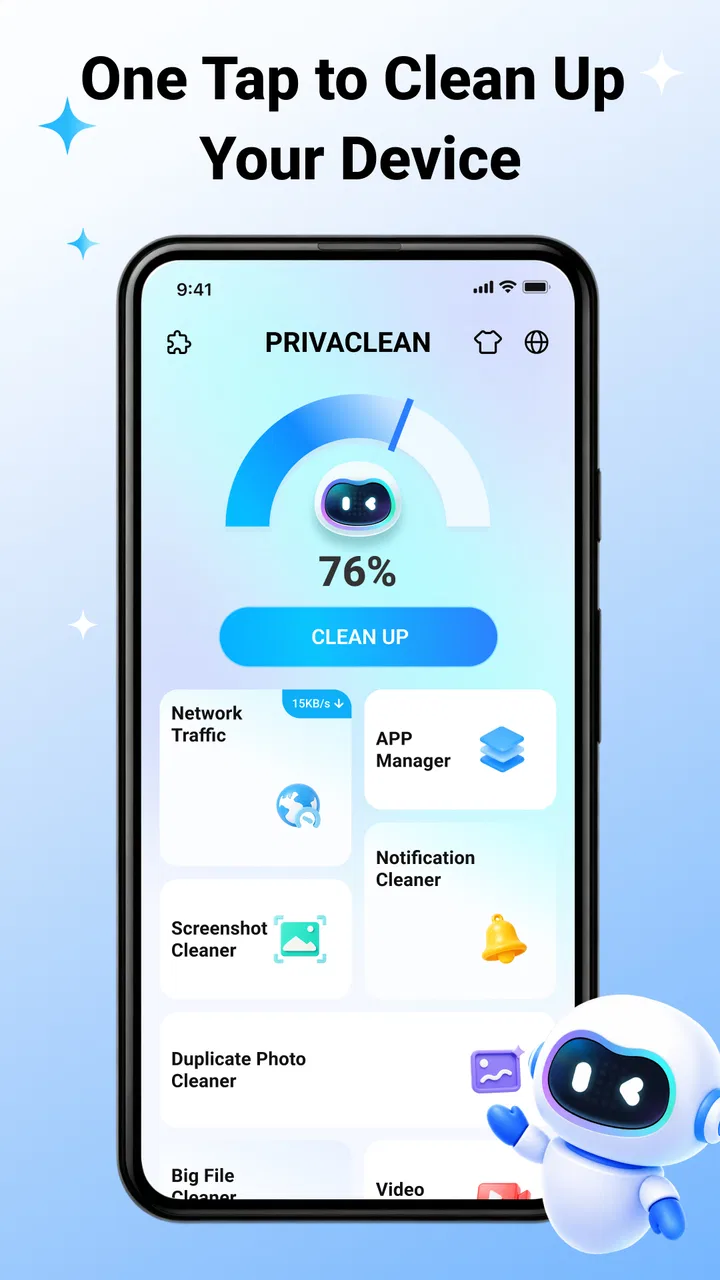
The central appeal is simple: PrivaClean brings photos, videos, and files into a cleanup workflow instead of making you hunt through separate storage locations. That matters when you are dealing with a crowded gallery or a phone shared between work, messaging, downloads, and personal media. I found the app most useful when I treated it as a review step before deletion, not as a button to press blindly. The best results come from deciding what is safe to remove before confirming cleanup.
How I would decide whether PrivaClean fits
My first decision criterion would be the kind of mess on your phone. If your storage issue comes mainly from photos, videos, and miscellaneous files, this app is directly aimed at that problem. If you are trying to manage large applications, system data, cloud backups, or advanced device diagnostics, a built-in storage screen or a more specialized utility may fit better. PrivaClean’s value is in organizing personal files for inspection, not in replacing every storage-management tool on a phone.
You May Also Like

 Blood Strike: 2.5 Anniversary
Blood Strike’s Loadouts Turn Every Drop Into a Tactical Gamble
A close look at Blood Strike’s custom loadouts: how fast access to signature weapons reshapes its battle royale rhythm, rewards preparation, and narrows the gap between fights.

 Pandora - Music & Podcasts
Pandora’s Music Is Easy to Start, but Harder to Recover
Pandora’s strength is its low-effort path from a seed to a station. Its weak spot is how much confidence it asks you to place in connection, setup, and quiet recovery.

 8 Ball Pool
 Is Built on Rivalries, Rematches, and Routine
A close look at the rivalries, rematches, shared routines, and unanswered safety questions that turn a quick pool match into a persistent mobile community.

 Samsung Music
’s Quiet Strength Is Playing What You Already Own
Its reach comes less from spectacle than from dependable access to a personal library. That simplicity is both the app’s strongest retention engine and its ceiling.

 AccuWeather: Weather Radar
AccuWeather Review: A Quick, Clear Forecast for Everyday Decisions
For everyday plans, the best forecast is the one you can understand quickly. AccuWeather makes rain timing, radar, and local conditions easy to act on, with a few trade-offs.

 Hill Climb Racing
Why Hill Climb Racing Still Turns Crashes Into One More Run
A tiny car, a bumpy hill and one more upgrade: Hill Climb Racing keeps resurfacing because its simple chaos makes every near-miss feel personal.
More From Our News Desk



The second criterion is how much control you want. Some cleaners emphasize speed and encourage a broad “clean everything” approach. I prefer a tool that gives me a chance to recognize the files first, because a screenshot, a family video, or a document saved from a chat can look unimportant until it is gone. PrivaClean makes sense for users who want assistance finding clutter but still expect to make the final call themselves.
The third question is whether you are comfortable reviewing visual material in batches. A photo-heavy cleanup can be surprisingly tiring. The difficult part is not locating files; it is remembering why they exist. I would set aside a few quiet minutes rather than opening the app while rushing to free space before taking a trip. That small change in timing makes the process safer and less frustrating.
PrivaClean is available at no cost, which lowers the barrier to trying it. Its Everyone content rating also makes it approachable for a broad household audience, although younger users should still understand that deleting a file can have consequences. The app runs on Android versions from 7.0 onward, so it is not limited to recent phones. That is useful if you are helping someone maintain an older device instead of replacing it.
What the first cleanup should look like
I would begin with a narrow goal rather than attempting a complete digital spring-cleaning session. For example, choose old videos first, or inspect downloaded images before touching personal albums. A narrow pass helps you learn how PrivaClean presents items and reduces the chance of making a rushed decision. Once you know the workflow, you can move to other file groups with more confidence.
One practical habit is to separate “temporary clutter” from “personal history.” Temporary clutter includes files saved for one-time use, repeated images from group chats, and media that you already sent elsewhere. Personal history includes family photos, recordings, scans, and anything that would be difficult to recreate. The app can help bring attention to both groups, but it cannot know the emotional or practical value of a file as well as you do.
I also recommend checking whether an item is stored in more than one place before removing it. A copy in a messaging folder may not be the same as a copy in a camera folder, and deleting one does not automatically mean the other is protected. This is one of the less obvious trade-offs of any file cleaner: organization improves visibility, but visibility is not the same as a backup.
Where the app feels most useful
PrivaClean’s strongest use case is the phone that has gradually accumulated media without a clear filing system. I am thinking of a device used for screenshots, shopping images, work attachments, short clips, and social-media downloads. In that situation, manually opening every folder is tedious. A cleanup-focused interface gives the task a beginning and an end, which is often enough to turn an ignored problem into a manageable one.
It is also a sensible option before a major move to a new phone. I would not use it as the only preparation step, but I would use it to distinguish files worth transferring from files that merely came along for the ride. Removing disposable material first can make migration less cluttered and help you start with a more understandable gallery. The important order is backup or transfer first for anything valuable, cleanup second.
Another useful scenario is a family member’s older phone that keeps reporting low storage. Rather than asking that person to understand every folder, I could sit with them and review the visible categories together. The app’s plain purpose makes the conversation easier: identify what is no longer needed, preserve what matters, and stop when the remaining files are meaningful. That human review is more important than any automated suggestion.
For people who regularly save reference material, PrivaClean can also act as a monthly checkpoint. I would use it after a busy period rather than every day. A short, scheduled review is less disruptive than repeatedly checking storage warnings, and it encourages a better habit: remove files after their purpose has ended instead of letting them become part of a permanent pile.
Three details that change how I would use it
First, I would treat visual similarity as a prompt to compare, not proof that two files are identical. Photos taken seconds apart may look alike while preserving different expressions or moments. The same applies to screenshots: one may contain a detail that the other does not. A cleaner can reduce the search effort, but the final comparison still belongs to the user.
Second, I would be especially careful with documents mixed into general file cleanup. A downloaded form, boarding pass, receipt, or work attachment may seem disposable because it is old, yet it could be needed later. My workflow would be to clear obvious temporary media first and leave documents for a separate pass. This avoids combining quick visual decisions with files whose importance is harder to judge.
Third, I would not measure success only by the amount removed. A smaller, understandable file collection is more valuable than a large deletion that creates anxiety. After cleaning, I would open the gallery and file areas I use most, confirm that essential material remains, and then stop. PrivaClean is more helpful when it supports a controlled routine than when it becomes an invitation to keep deleting.
How it compares with the usual alternatives
The most obvious alternative is the storage manager already included with Android. That option is often better for understanding broad storage usage, especially when applications or system categories are the main source of the problem. It may also be the more familiar choice for someone who wants fewer separate utilities. I would choose the built-in manager when I need a high-level diagnosis, then consider PrivaClean when personal photos, videos, and files require more focused attention.
A file manager is another alternative. It usually offers more direct control over folders, names, and locations, which is valuable for organized users who already understand their storage structure. The trade-off is that manual browsing can be slow when the phone contains years of scattered media. PrivaClean is more appealing when the challenge is discovering clutter, while a file manager is stronger when the challenge is precise filing.
Gallery apps with their own duplicate or unwanted-item tools may be preferable for someone whose problem is almost entirely photographic. They can fit naturally into a photo-first routine. PrivaClean becomes more interesting when the cleanup extends beyond the gallery into videos and general files. I would not switch simply because one app has a cleaner-looking interface; I would choose based on where the clutter actually lives.
Dedicated security or privacy utilities belong in a different comparison. Their main purpose may be protection, scanning, or permission awareness rather than organizing personal storage. PrivaClean’s name suggests a privacy-conscious cleanup angle, but I would judge it here by its practical file-management role. If your priority is device security rather than freeing space, look for a tool designed around that specific job instead of expecting a cleaner to cover it.
What may cause friction
Cleanup always carries a risk of overconfidence. A neatly grouped list can make deletion feel safer than it is. I would therefore avoid granting myself a “clean first, think later” mindset. If you are the person in your household who gets asked to recover deleted photos, this caution is especially important. The app can streamline selection, but responsibility for irreplaceable content remains with you.
There is also a time cost. A careful cleanup is not instant when the phone contains years of personal media. Reviewing files properly may take longer than expected, particularly if you are sentimental about photos or rely on downloads for work. That is not a flaw unique to PrivaClean, but it affects the value proposition: the app reduces searching, not the need for judgment.
I would also skip it if my main goal were to make a slow phone feel faster without understanding why it is slow. Removing clutter may help create breathing room, but storage cleanup is not a universal answer for battery drain, aging hardware, unstable applications, or network problems. In those cases, the built-in device tools or a repair diagnosis would be a more appropriate next step.
The cost of switching to a new cleanup routine
Moving from manual deletion to PrivaClean is not difficult, but it does require a change in habit. Instead of opening individual folders whenever storage becomes urgent, you need to create a review routine and learn which categories deserve attention first. I would start with one session, note which types of files were genuinely disposable, and use that knowledge during the next cleanup.
The cost is mainly attention, not money. Because the app is free, trying it does not require a paid commitment. Still, free does not mean consequence-free: the real cost of a mistake is losing a file that was never backed up. I would keep important photos and documents protected elsewhere before making broad changes, regardless of which cleaner I used.
PrivaClean’s current version is V1.0.4, and the app is still a relatively focused choice rather than a complete personal-data management system. That makes the learning curve approachable, but it also means I would not expect it to replace every storage and maintenance feature already available on a phone. I see it as one useful layer in a sensible routine, not the entire routine.
Who should install it, and who should pass
I would recommend PrivaClean to someone who has a crowded Android phone, wants a free cleanup option, and prefers to inspect photos, videos, and files before deleting them. It is particularly suitable for people who have lost track of downloads and media folders but do not want to become full-time file administrators. The broad Everyone rating and support for older Android versions make it practical for shared or aging devices too.
I would be more cautious about recommending it to a user who expects one tap to solve every performance issue. I would also point experienced file organizers toward a conventional file manager if they need exact folder-level control, and I would point security-focused users toward a dedicated privacy or protection tool. The right choice depends on whether your problem is clutter discovery, file organization, system diagnosis, or device security.
The app’s public reception is encouraging without being a reason to skip careful testing: it holds a 4.3 average from around 473 ratings and has passed 500K installs. Those figures suggest that many people find the concept useful, but they do not remove the need to review files responsibly. I would use the app’s popularity as reassurance that it is worth trying, not as permission to delete automatically.
My recommendation after using it
My recommendation is straightforward: try PrivaClean if your storage problem is mainly a disorganized collection of photos, videos, and files, and use it as a guided inspection tool. Begin with disposable material, protect anything important, and keep documents separate from quick visual cleanup. That approach brings out the app’s practical strength while limiting the danger of an impulsive deletion.
I would not install it expecting a complete phone-maintenance suite, nor would I abandon the built-in storage manager or a file manager when those tools better match the problem. PrivaClean earns its place when the challenge is seeing personal clutter clearly and making a deliberate decision about it. For that specific job, it is a sensible free addition to an Android cleanup routine.
In the end, I like the app because it encourages a useful middle ground between doing everything manually and trusting an automatic cleaner too much. It can make an unpleasant task more approachable, especially on a phone where media has accumulated unnoticed. If you are willing to spend a little time reviewing what you see, PrivaClean is worth trying; if you want diagnosis, advanced organization, or security protection, choose the alternative built for that purpose instead.
FAQs for PrivaClean — Phone Cleaner
01What is PrivaClean — Phone Cleaner used for?
PrivaClean — Phone Cleaner is designed to help organize and maintain storage on an Android or iOS device. Its main purpose is to identify removable items such as duplicate photos, large files, temporary data, and other unnecessary content. Before cleaning, users should review the suggested files carefully, since some items may still be useful or personally important.
02Is PrivaClean — Phone Cleaner safe to use?
The app can be useful for finding clutter, but its safety depends on the permissions it requests and how its cleaning features work on your device. Review the privacy policy, app-store permissions, and confirmation screens before granting access. Avoid approving automatic deletion without checking the selected files, and keep a backup of important photos, videos, and documents.
03Can PrivaClean delete photos, videos, or important files by mistake?
Any phone-cleaning application may present files for deletion, so accidental removal is possible if selections are not reviewed. PrivaClean should be used as an assistant rather than a completely automatic solution. Check duplicate groups, large-file lists, and suggested cleanup categories manually, make sure cloud backups are complete, and remember that deleted content may not always be recoverable.
04Does PrivaClean — Phone Cleaner improve phone performance?
PrivaClean may help free storage space, which can make a device feel more responsive when it is close to full. However, it cannot solve every performance problem. It will not replace system updates, restarting the phone, removing genuinely unused apps, or checking battery and hardware issues. Results depend on how much unnecessary data the app finds.
05Is PrivaClean — Phone Cleaner free, and does it contain subscriptions?
The available features, advertising, and subscription options can vary by platform, region, and app version. Before starting a trial or unlocking premium tools, check the current store listing and the in-app purchase screen for pricing, renewal terms, and cancellation instructions. Users should confirm whether the free version is sufficient and avoid accepting recurring charges unintentionally.
Pros
- Quickly identifies junk files
- caches
- and unused data.
- Simple interface makes storage cleanup easy for beginners.
- Can help free space without requiring advanced technical knowledge.
- Useful tools for reviewing large files and duplicate content.
- Privacy-focused cleaning approach is reassuring for cautious users.
Cons
- Some cleaning features may require a premium subscription.
- Results can vary depending on device storage and Android version.
- Aggressive cleanup may remove files you intended to keep.
- Background scanning can use battery and system resources.
- iOS functionality may be more limited than the Android version.

PrivaClean — Phone Cleaner
Gallery